
If your Google Business Profile is suspended, Google has found something it believes breaks its guidelines. Common causes are keywords in the business name, an ineligible address, or duplicate profiles. Fix the cause first. Then submit one appeal through the official appeals tool with documents showing your business name and address.
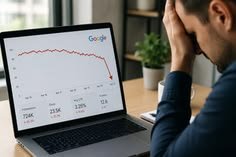
Quick Answer: If your website traffic dropped suddenly, first confirm the drop is real by comparing Google Analytics with Google Search Console. Then check the date against Google’s Search Status Dashboard, review Search Console for indexing, manual action and security alerts, and look at which pages and queries lost clicks. The shape of the drop usually points to the cause.
You open your analytics on Monday morning and the line that used to climb now looks like a cliff. It is a stressful moment, especially when your phone calls and form leads depend on that traffic.
Here is the reassuring part. Google itself notes that traffic drops happen for many reasons and most of them can be reversed. The key is finding the actual cause before you start changing things. Rewriting pages or deleting content in a panic can turn a temporary dip into a lasting problem.
This guide walks you through the same order of checks we use in our technical audits, so you can separate a tracking glitch from a real ranking loss in about an hour.
A sudden traffic drop is a sharp decline in visits, usually 20% or more, that appears within days rather than gradually over months.
Small weekly swings are normal. Holidays, weather, news cycles and paydays all move traffic. A drop deserves investigation when it is large, lasts more than a week, or hits your most important pages, such as service pages or top blog posts.
It also helps to know which kind of traffic fell:
| Traffic Type | Where It Comes From | Where to Check |
|---|---|---|
| Organic search | Google, Bing and other unpaid results | Google Search Console, Bing Webmaster Tools |
| Direct | Typed URLs, bookmarks, untracked apps | Google Analytics 4 (GA4) |
| Referral | Links from other websites | GA4 traffic acquisition report |
| Paid | Google Ads, Meta Ads | Ad platform dashboards |
| Social | Facebook, Instagram, LinkedIn | GA4 and native social insights |
| AI referrals | ChatGPT, Perplexity, Gemini | GA4 referral sources |
If only one channel fell, your investigation just got much smaller.
Start here, because a surprising number of “traffic drops” are actually broken tracking, not lost visitors.
Compare GA4 with Google Search Console for the same dates. Search Console measures clicks on Google’s side, so it keeps counting even if your analytics code breaks. If GA4 shows a crash but Search Console clicks look normal, the problem is almost certainly tracking.
Common tracking culprits include:
A quick test: open your site in a private window, then check GA4’s Realtime report. If you do not appear, the tag is not firing.
The pattern of the decline is one of the best clues you have, because different problems leave different shapes on the graph.
Google’s own guidance on debugging traffic drops uses this same idea, and notes that a noticeable drop in traffic without a big change in impressions can show up in Search Console. Here is how we read the most common patterns:
| Drop Pattern | Likely Causes | What to Check First |
|---|---|---|
| Overnight cliff across the whole site | Site outage, noindex tag, robots.txt block, hack, manual action | Search Console alerts, robots.txt, homepage source code |
| Steady slide over two to three weeks | Google core update rolling out | Search Status Dashboard dates |
| Drop on certain pages only | Lost rankings, competitor content, broken redirects | Search Console Pages report, compare periods |
| Same dip every year | Seasonality | Year over year comparison, Google Trends |
| Impressions steady but clicks down | AI Overviews, new SERP features, weaker titles | Click through rate by query |
| Drop right after a redesign or migration | Missing redirects, changed URLs, lost content | Redirect map, 404 errors |
Check whether your drop lines up with a confirmed Google update on the Google Search Status Dashboard, which lists every core and spam update with start and end dates.
2026 has already been busy. For example, the March 2026 core update started March 27 and completed April 8, and the May 2026 core update completed its rollout on 2 June 2026. A spam update also ran in March, finishing in under 20 hours on March 24 and 25. google confirms march 2026 core update is complete +2
If your drop matches one of these windows, keep two facts in mind:
Recovery from a core update typically comes from improving content quality over time, not from quick technical tweaks. Google has also said the biggest changes tend to follow another core update, so patience is part of the process.
Yes, and technical problems are among the most common and most fixable causes of a sudden, sitewide drop.
Google’s Search Central team groups technical issues as errors that stop Google from crawling, indexing or serving your pages, including server availability, robots.txt fetching and page not found errors. Check these in order:
If pages are crawled but not making it into the index, our guide on crawled currently not indexed explains that issue in depth.
A hack can cause a sudden drop because Google may warn visitors away or show spam pages in place of your real content.
Google notes that when a site has a security threat, it may alert users before they reach your site with warnings or interstitial pages, which cuts clicks fast. Check the Security Issues and Manual Actions sections in Search Console, then search “site:yourdomain.com” on Google and look for pages you never created, often in other languages or about pharmacy, casino or replica products.
If you spot strange pages, our article on SEO spam hacks covers the warning signs and cleanup steps.
If impressions stayed steady but clicks fell, AI Overviews or other search features may be answering the question before people reach your site.
This is now one of the most common patterns for informational content. The page still ranks, still appears, but fewer people need to click. To check, open Search Console’s Performance report, enable both Clicks and Impressions, and compare click through rate (CTR) for your top queries before and after the drop.
What helps in this situation:
Being cited inside AI answers is a different visibility channel. You can test it yourself with our guide to checking whether ChatGPT recommends your business.
Sometimes nothing is wrong with your site at all. People are simply searching less for your topic right now.
Google’s documentation suggests checking whether a drop happens every year due to a festivity or a trend. Compare the same months year over year in Search Console (it keeps 16 months of data), and look up your main keywords in Google Trends.
A few real world examples:
If demand fell across the whole market, rankings likely did not change. Your share stayed the same, the pie just got smaller.
Work through these 10 checks in order. Stop and fix as soon as you find a clear cause.
Here is a simplified, illustrative case based on patterns we see often. A home services company in Texas loses 45% of organic clicks over one weekend. Owners assume a Google penalty.
The checklist tells a different story. GA4 and Search Console both confirm the drop, so tracking is fine. No core update was running. The Pages report shows hundreds of URLs suddenly “Excluded by noindex tag.” The cause: a plugin update switched the service post type to noindex.
The fix took five minutes. Requesting reindexing in Search Console and waiting for recrawls brought most traffic back over the following weeks. The lesson is simple. Diagnose first, then act.
| Tool | What It Helps You Find | Cost |
|---|---|---|
| Google Search Console | Clicks, impressions, indexing, manual actions, security issues | Free |
| Google Analytics 4 | Channel breakdown, landing pages, AI referrals | Free |
| Google Search Status Dashboard | Confirmed update dates | Free |
| Google Trends | Seasonal and market demand shifts | Free |
| Bing Webmaster Tools | Cross check against a second search engine | Free |
| PageSpeed Insights | Core Web Vitals and speed issues | Free |
Paid tools like Semrush or Ahrefs add competitor ranking history, which is useful once you know the drop is ranking related.
You can handle the first checks yourself. Consider bringing in an experienced SEO team when the drop is over 30% and lasts more than a month, when you recently migrated or redesigned your site, when Search Console shows a manual action or security issue, or when you simply cannot find a clear cause.
A professional audit is most valuable when several small issues stack together, such as weak internal linking, slow hosting and thin content, because each one alone does not look serious.
The most common causes are broken analytics tracking, a Google core update, technical problems like noindex tags or robots.txt blocks, a security issue, seasonality, or AI Overviews reducing clicks. Compare Google Analytics with Search Console first, then match the drop date to Google’s Search Status Dashboard to narrow it down.
There is no fixed timeline. Some sites see partial recovery within weeks, while others need until the next core update, which can be several months away. Recovery usually depends on genuinely improving content quality and usefulness rather than technical changes, so steady work matters more than speed.
Open Google Search Console and check the Manual Actions report. If it says no issues detected, you do not have a manual penalty. Ranking losses from algorithm updates are not penalties. They reflect Google reassessing which pages best answer a search.
Yes. Redesigns often change URLs, remove content, break internal links or launch without tracking code. Every old URL should 301 redirect to its closest new page, and important content, headings and metadata should carry over. Checking Search Console for new 404 errors after launch catches most problems early.
This usually means people see your listing but click less. Common reasons include AI Overviews answering the question directly, new search features pushing results lower, competitors with stronger titles, or a drop in average position within page one. Compare click through rate by query to find the affected searches.
Usually not right away. A page that lost traffic may still hold backlinks, rankings for smaller queries or value for visitors. Improve, update or merge it with a related page first. Delete only when the content is truly outdated or unhelpful, and redirect it to a relevant page.
Compare the same date range from last year in Google Search Console, which stores 16 months of data. Then check your main keywords in Google Trends. If both show a similar dip at the same time each year, the drop is likely seasonal demand rather than a ranking problem.
Yes. Hacked sites can show browser warnings, get flagged in search results or have spam pages indexed under your domain. All of these reduce trust and clicks. Check the Security Issues report in Search Console and run a site search on Google to spot unfamiliar pages.
A sudden traffic drop feels urgent, but the fastest route to recovery is calm diagnosis. Confirm the drop is real, read the shape of the graph, line it up with known updates, and rule out technical blocks, hacks and seasonality before changing your content. Most drops have a clear cause once you look in the right order.
If you have worked through the checklist and still cannot pinpoint what happened, the team at Optimistx Tech Lab is happy to take a look. We review your Search Console data, technical setup and content to find what is holding your traffic back and which fixes matter most. Reach out whenever you are ready to talk it through.